On PHP, C, C++, CSS and a lot of others languages. You can comment your code using:
/* commented text */
Right, but when you do a lot of programming (and use a great editor like jEdit), you start to notice that there are more than one way to make comments. you can also do:
/** commented text **/
It’s almost the same, but the second one takes a nice purple color instead of the high pitched red of the common comment.
So whats the difference?, the first one is meant to comment a piece of code that doesn’t work and things like that(in other owrds debugging). and the second one is meant to leave permanent comments.
/** Sends an HTML version of the Row to the output **/
$Row->show();
/*why does it keeps failing!!!!!!
$Row->delete(SCR_LAST)
delete($Row);*/
So after learning that I felt that CSS syntax highlighting on jEdit wasn’t really acurate because it didn’t make this difference.
so I made a little fix… search for the file css.xml on /usr/share/jedit/modes/ (on ubuntu) and replace this:
<SPAN TYPE="COMMENT1">
<BEGIN>/*</BEGIN>
<END>*/</END>
</SPAN>
With this:
<SPAN TYPE="COMMENT3">
<BEGIN>/**</BEGIN>
<END>*/</END>
</SPAN>
<SPAN TYPE="COMMENT1">
<BEGIN>/*</BEGIN>
<END>*/</END>
</SPAN>
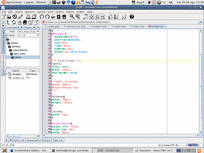
Now restart jEdit and you shoud have different colors for “/* */” and “/** **/”.
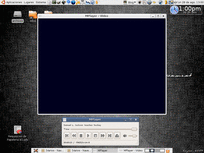
Scrot the program that I’m using to take the screenshots on Screenshots Gallery, can’t take the output of Mplayer :(.
Esta mañana escuche a Jorge Castañeda, el secretario de gobernación de Fox, decir algo que me dejó con cara de “que carajos”.
“Durante un tiempo el presidente Fox estuvo hablando con los medios de comunicación para que dejaran de pasarlo (a López Obrador) en cadena nacional, que era temas locales y deberÃan de quedarse como tal” Jorge Castañeda en entrevista con Oscar Mario Bedeta.
El se referÃa a que los medios eran los que habÃan hecho grande a López Obrador, no lo niego asà fue.
¿Pero que carajos tiene que estar haciendo Fox diciendole a los medios que no pasen a López Obrador en cadena nacional?
La respuesta de mi madre al comentario fue reveladora: “Ay hijo, es que desde entonces se notaba que era un peligro para México”, eso sà que me dejo sin palabras…

You can see it working here http://levhita.net/screenshots/, and now it has it’s own page here Screenshots Gallery.
This new version is really improved on the server-side and small changes has been made on the client-side to create smaller thumbnails.
The current features are:
- A bash script that take and upload the screenshots using a ssh or ftp connection.
- A powerfull template engine(basically a php file with the needed objects at hand, what could be more powerful than that?).
- Automatic generation of thumbnails and web version of the screenshots.
- Multiple language support (Currently English and Spanish, the strings list is really short, soo you should be able to translate it to your language really fast).
- “Taken 2 Months, 15 Days ago” style text, taken from NatBat time_since() function.
RSS Feeds, Title/Description database storage and a Windows based uploader are on their way!.
Thursday, August 24, 2006
In my new job we there is a heavy use of the company mail, and most of the people use outlook to check his mail.
Actually, most of the people doesn’t know that there is a web version, well, After having a fight against spam this week(installing spamassassin in the corporate mail) I tougth that maybe, just maybe, I should use a desktop based mail reader.
So I gived a chance to evolution and I’m pretty happy, I started to use my gpg signature again (well I remade it so forget about the old one) and I synchronized my full gmail account.
So, Levhita has evolved, ¿or maybe devolved?, because you know that Gmail does a really great job on the web interfaces side.
Wednesday, August 23, 2006
After 3 days of hard work, I finally made work Spamassassin, I learn a lot about Spam, Qmail, DNSs and IMAP.
Now we are training Spamassassin (789 hams and 1034 spams right now), I made a nice script that allows me to trigger training automatically.
Thanks to everyone for your help (specially Izto).
See you later aligator!!
My Screenshoter script is getting mature (and big), the client that uploads the screenshots is the same, but the server script has turned in a full application.
Today I finished the translation system, date detection and generation (in the selected language of course), and refactored everything as objects.
Now I have a pretty nice Images interator (using SPL standard library) and an Image class that will handle everything as a real object, not as a simple set of filenames.
It will have an admin interface to add titles and comments(stored in mysql), and a template system soo you can have a custom look easily.
You can get the last development version from http://svn.levhita.net/screenshots_gallery/ using svn.
As soon as an stable release is ready, I’ll make it public in his own page with news, changes history, instructions, tips and all those pretty stuffs that you should find in any project page (including screenshots of course).
For the moment it does exactly the same of the last version, but with a little more information stored in the Image object.
You can get it and play with it if you wan’t..I don’t use the database and the secretword yet, so you don’t have make big changes.
Cheers and happy screenshoting!
“Entusiasmadas, las chicas se dejan grabar con una cámara de vÃdeo, mientras dan su mejor desempeño en la golpiza…”